Put the location task first
Power Outage is an independent US outage monitor whose public homepage includes city or location navigation, data-and-coverage information, and utility links. This brief does not establish uptime, accuracy, completeness, or conversion performance, and this article is a proposed design study rather than a completed redesign.
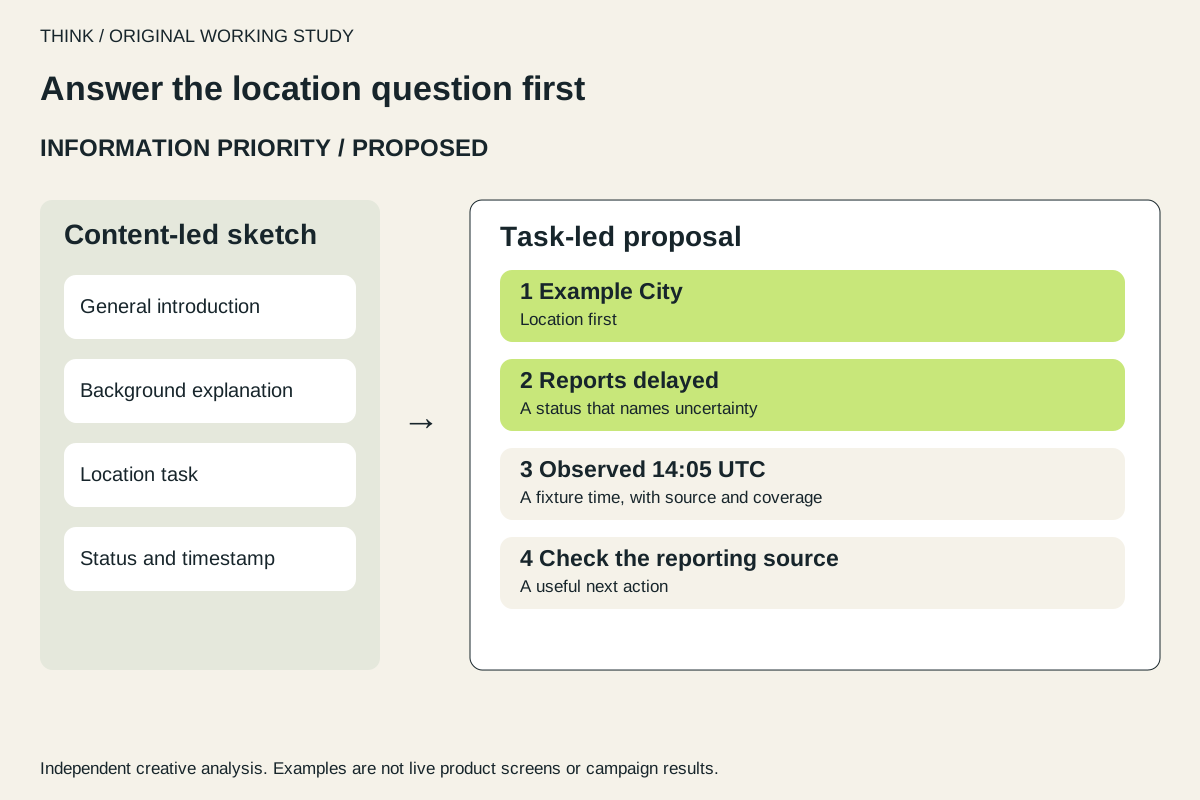
Our interpretation is that a person arriving during an outage needs a quick route to a relevant location and an honest account of what the displayed information can establish. A proposed hierarchy would present location, status, and update time before secondary explanation or promotional content. This sequence is a design hypothesis to evaluate, not an observation of current user behavior.
Use status language that names limits
Examining Power Outage’s existing site helps ground this brief in its actual public focus: location navigation, data coverage, and utility links. That context makes the design question specific: how can someone find relevant outage information while seeing what the available data does and does not establish?
We propose a status card with a location, a status label, an observation timestamp, and a source. Suggested microcopy for an older observation: “Last observed at {time}. This information may be out of date.” For partial coverage: “Some areas may not be represented. Check your utility for the latest information.” These are proposed examples, not live claims or existing site copy.
Workshop: a status card with honest empty states
The wireframe compares two invented hierarchies, not a before-and-after audit of the current site. The task-led proposal puts location and status ahead of explanation. Below it, a keyboard-operable prototype demonstrates recent, stale and missing observations using fixed fictional data.
Try the status-card states
Fictional location, source and fixed timestamps. This is a design prototype.
Example City
Reports received
- Observation
- 14:05 UTC — fixture timestamp
- Source
- Example reporting feed
- Coverage
- Partial coverage. Missing reports do not establish normal service.
A recent observation is available in this example. Confirm the details with the reporting source.
| Component requirement | Reason | Acceptance check |
|---|---|---|
| Text status, not color alone | Communicate uncertainty without a color key | A reader can name the current state from text. |
| Observation and source travel together | Reused cards retain provenance | Both remain visible at 320px and 200% zoom. |
| Explicit unavailable state | Missing data cannot imply normal service | The card says that no status can be inferred. |
The state selector changes only the local demonstration. A recent observation still has partial coverage; a stale observation receives an explicit delay message; a missing observation removes the inferred status entirely. The source and limitations remain adjacent, so they cannot drift below a conversion form when the layout becomes narrow.
The standalone HTML file is editable, requires no library and sends no network requests. Use it as the starting point for a usability test: ask a participant to identify the location, state, observation time and limitation, then ask what remains unknown. Record incorrect certainty as an error even when the participant reaches the last control successfully.
Take the working files
Make the timestamp part of the content
A proposed CMS status card would store the displayed location, status text, observation timestamp, source label, and an indication of coverage limits. The card should expose a clear empty or unavailable state rather than implying that no outage exists when data is absent. This is a suggested model; the brief does not document the site’s current data pipeline or CMS. [2]
Our interpretation is that timestamps and source context are part of the information itself, not a decorative footnote. If the content is reused in a map, list, or utility link panel, those qualifications should travel with it. A content owner should be able to correct wording and update status without accidentally removing the timestamp or source.
Keep the essential task ahead of lead capture
We propose keeping a lead form or other conversion request after the location and status task, so it does not obstruct access to urgent information. This is a prioritization recommendation, not evidence that the current page places a form ahead of that task or that moving one would change conversion.
The page should also offer readable status text and controls whose purpose is clear to people using assistive technology. WCAG guidance calls for text alternatives for non-text content and names that describe the purpose of controls. For a proposed outage map, that supports pairing visual indicators with text and labeling location controls in a way that communicates their function. [1]
Test the proposed hierarchy with real tasks
Our suggested usability protocol would ask participants to find a specified location, identify the displayed status, state when it was observed, and find the relevant utility link. Include keyboard and screen-reader users, and test a normal, stale, partial, and unavailable data state. Record task completion, errors, and whether people can correctly explain the limitations; these are proposed measures, not established results.
A next step is to prototype the hierarchy and status card, then test whether people can answer the urgent question without inferring unsupported certainty. The study should verify that timestamps remain visible across responsive layouts and that partial coverage wording is understood. No result can be claimed until the concept is implemented and evaluated; trust signals should communicate provenance and limits, not imply verified real-time accuracy.
Sources & useful references
Results are attributed to the original publisher. Proposed tests and creative recommendations are our analysis.