Start with the learner’s first decision
This is a proposed video concept for the owner-related US driving preparation website Driving Test Guide. No video has been produced, no test has been run and no conversion result is claimed. The established subject is US DMV preparation; this brief does not establish particular current site features, pass rates or official endorsement. [3]
The practical challenge for an introductory video is to make the first useful step clear without implying that preparation guarantees an outcome. In our interpretation, a fictional learner choosing state-specific preparation gives the viewer a concrete decision to follow. The concept should orient, demonstrate a next step and invite exploration, while leaving the learner responsible for checking the requirements that apply to them.
Storyboard 45 seconds from question to next step
Proposed storyboard: 0–5 seconds, show a fictional learner at a desk with a study notebook. On-screen text: “Getting ready for your DMV test?” Narrator: “Start by identifying the state whose rules you need to study.” Matching action: the learner looks at a state selection on a generic screen, with no claim about an existing website interface.
At 5–15 seconds, show the learner choosing a state from a clearly labeled, fictional menu. On-screen text: “Choose your state.” Narrator: “Preparation can depend on where you’ll take the test, so begin with the right state.” At 15–30 seconds, show a short study session with a notebook and a generic practice question. Narrator: “Set aside a few minutes to review a topic, answer a question, and note anything you want to revisit.” This example describes proposed actions, not current product functionality.
Workshop: eight frames, one useful next step
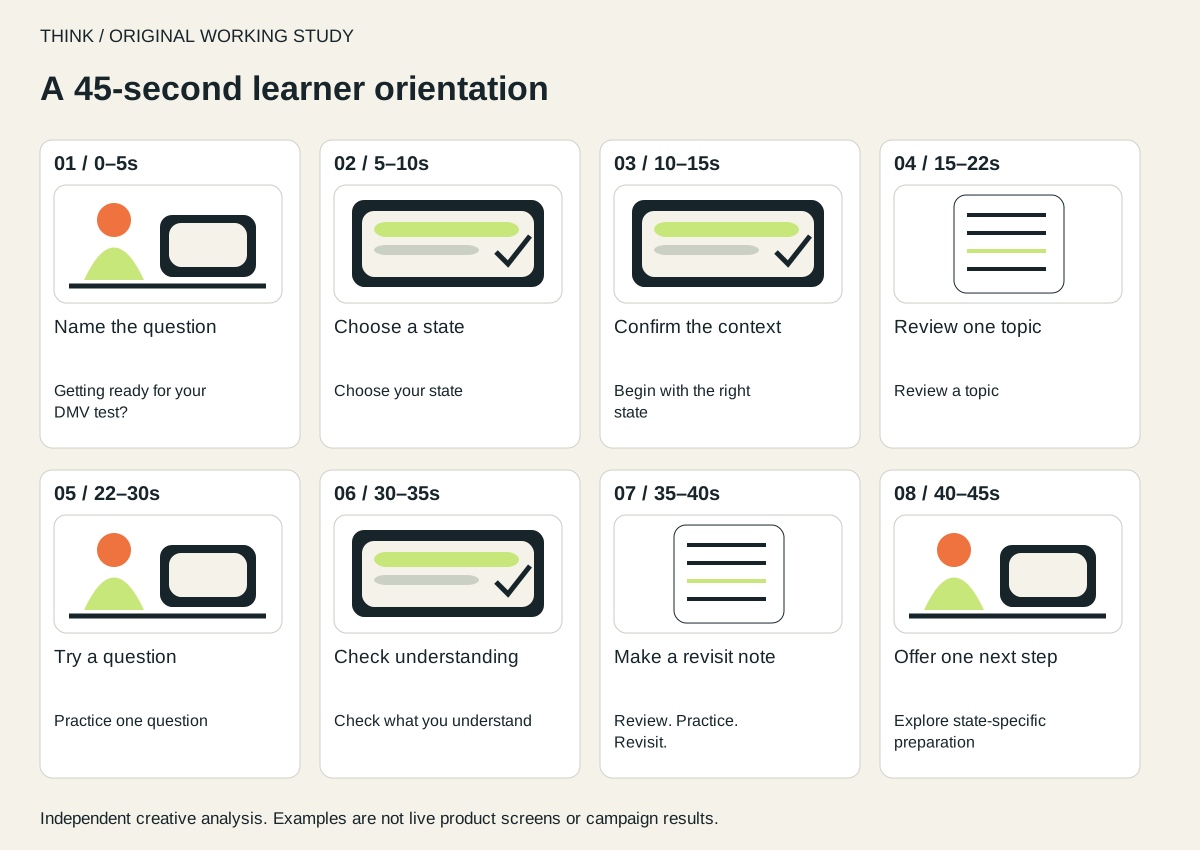
This original eight-frame board turns the written concept into a production sequence. The drawings establish framing and screen priority; they are not shots from a completed film or a reconstruction of the current website. Every frame has a matching script line and an exact time allowance.
| Time | Purpose / framing | Screen copy | Narration |
|---|---|---|---|
| 0–5s | Name the question — Desk / medium shot | Getting ready for your DMV test? | Start by identifying the state whose rules you need to study. |
| 5–10s | Choose a state — Generic screen / close-up | Choose your state | Preparation can depend on where you’ll take the test. |
| 10–15s | Confirm the context — Screen / held frame | Begin with the right state | Begin with the right state. |
| 15–22s | Review one topic — Notebook / overhead | Review a topic | Set aside a few minutes to review a topic. |
| 22–30s | Try a question — Screen / close-up | Practice one question | Answer a question and note anything you want to revisit. |
| 30–35s | Check understanding — Answer review / close-up | Check what you understand | Check what you understand. |
| 35–40s | Make a revisit note — Notebook / overhead | Review. Practice. Revisit. | Return to topics that need more review. |
| 40–45s | Offer one next step — Desk / final frame | Explore state-specific preparation | Explore state-specific preparation. |
The board deliberately holds the state-selection screen for two shots rather than cutting through it. That gives the learner time to see the decision and hear why it matters. The closing five seconds repeat the same action as the email invitation, so the film does not introduce a competing promise at the end. Rehearse every slot with a natural read; these time allowances are a first production plan, not a measured finished edit.
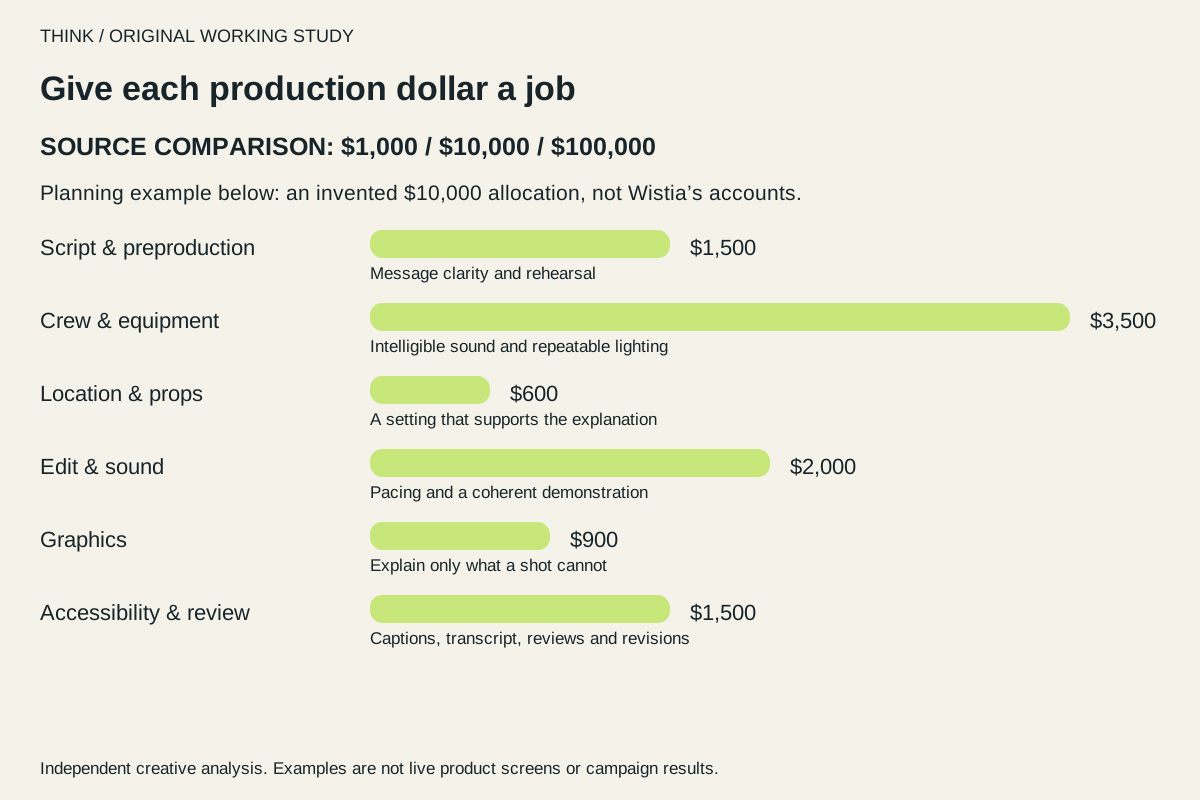
Use the editable brief to price a small shoot and assign caption, transcript and subject-review owners. Its $1,300 allowance is an illustrative internal-production budget with explicit exclusions. Test the opening question and final action with representative learners before producing a master or paying for distribution.
Close on an action the viewer can understand
At 30–40 seconds, show the learner reviewing the answer and writing a follow-up note. Narrator: “Check what you understand, then return to topics that need more review.” On-screen text: “Review. Practice. Revisit.” At 40–45 seconds, return to the learner’s desk and show a clear call to action: “Explore state-specific preparation.” This wording is a proposed invitation; it does not promise a pass or assert an official relationship.
For email use, propose a static thumbnail showing the learner and the opening question, with concise alt text that communicates the same purpose. The email copy and video should agree on the next step, and the destination should make that action easy to recognize. Google Analytics guidance describes campaign tags as a way to identify traffic referred by campaigns and to distinguish creative links. [2] A tagged email link could help compare the video invitation with another creative, subject to suitable analytics setup.
Design captions, transcript and narration together
W3C recommends planning captions, transcripts and visual description. [1] For this storyboard, have the narrator read the state-selection instruction aloud, caption the narration and describe the confirmation screen in the transcript. Review the mobile text size before approving the edit.
The storyboard should also keep on-screen text readable and allow enough time to follow each step. These are proposed production choices, not documented properties of the site. A preproduction review could check whether someone can understand the sequence from audio alone, from captions and visuals together, and from the transcript without the video.
Test first use and understanding, not promised passes
If produced, the concept could be evaluated with a small, defined first-use test. Proposed measures include whether viewers reach the intended preparation step, whether they can explain why state selection matters, and whether they can identify the suggested next action. Completion and comprehension are proposed KPIs; they are not measured results or indicators of passing a driving test.
A practical next step is to review the storyboard with representative learners before production, then revise any instruction they misunderstand. After release, compare completion and next-step engagement across the video and a non-video treatment while keeping the audience and email context as similar as practical. Interpret the findings as evidence about orientation and comprehension, not a promise of test success or proof of official endorsement.
Sources & useful references
- W3C: making audio and video media accessible
- Google Analytics: collecting campaign data with custom URLs
- Driving Test Guide
Results are attributed to the original publisher. Proposed tests and creative recommendations are our analysis.